
Getting paid: when your money is available and how to withdraw it
Each delivered order becomes available balance 14 days after delivery, and never before the return window in the buyer's country ends, minus commission. You withdraw your available balance to your bank account whenever you like.
In this article
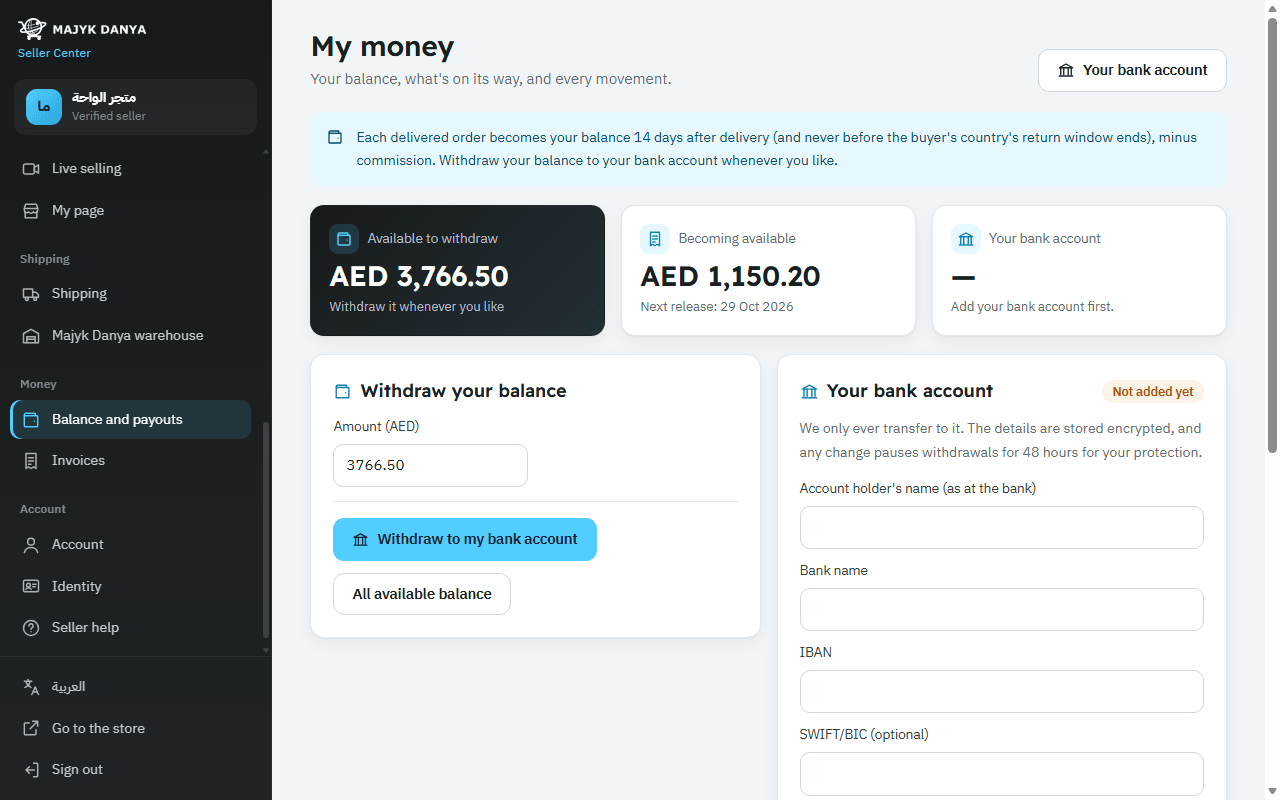
Majyk Danya collects order payments from buyers and credits your share to your balance after delivery and once the return window is over, minus commission. You then withdraw your balance to your bank account whenever you want. It all happens on the My money page (in the menu: Balance and payouts).
When does the money become available?
When an order's delivery is recorded, its amount appears under Becoming available. It becomes Available to withdraw 14 days after delivery, or when the return window in the buyer's country ends if that is later. The commission comes off on the same date.
| How the buyer paid | When you get the money |
|---|---|
| Online payment, pay later, bank transfer | The full order amount minus commission, 14 days after delivery or at the end of the return window if later. |
| Cash on delivery with a courier on your own account | The courier pays you the cash under your contract with it. Majyk Danya's commission comes off your balance on delivery. |
| Cash on delivery shipped on Majyk Danya's courier account, or from the Majyk Danya warehouse | The cash reaches Majyk Danya, so it works like an online payment: the amount is credited to your balance on its date. |
| Cash on delivery with some store credit | The courier collects less; the part paid with credit is credited to you on the release date. |
| Pay in 30 days (companies) | The money waits until the company pays, then becomes available on the usual date, or at once if that date has passed. |
The My money page
- Available to withdraw: what you can withdraw now, per currency.
- Becoming available: money on its way, with the Next release date.
- Movements: every amount in or out, with the order number and its Available from date.
- Withdrawals: each withdrawal, its status and the transfer reference.
Besides sales and commission, the movements show refunds from returns and the cost of the programs and services you chose. Details in Fees and commissions.
Add your bank account
- Open Balance and payouts from the menu, then go to Your bank account.
- Enter Account holder's name (as at the bank), Bank name, IBAN, the SWIFT/BIC if you have it, and choose the Account currency.
- Press Save bank account. The IBAN is checked automatically and refused if it isn't valid.
The details are stored encrypted; only the bank name and the IBAN's last 4 characters are shown. A new account, or any change to it, pauses withdrawals for 48 hours to protect you. Details in Bank account.
Withdraw your balance
- Under Withdraw your balance, enter an amount or choose All available balance.
- Press Withdraw to my bank account.
- Follow it under Withdrawals: the status shows Transferring, then Transferred with the Transfer reference.
A withdrawal is a bank transfer from Majyk Danya to your saved IBAN; the page says it is made within two working days. If a transfer fails, the status reads Failed, money returned to your balance with the reason, and the amount goes back to your available balance. Balances are kept per currency, so you withdraw each currency on its own.