Shipping methods
Ship with any carrier you choose, book Majyk Danya Express, Aramex or SMSA from the order page with an automatic label, tracking and a fixed label price you see before booking, or let our warehouse ship for you.
In this article
You choose how the parcel reaches the buyer. Ship your own way, book a courier from the order page, or let the Majyk Danya warehouse handle everything. Whatever you choose, the order must ship before its "Ship before" date.
At a glance
| Method | Who books | Label and tracking | Cost | Cash on delivery goes to |
|---|---|---|---|---|
| Your own way, any carrier | You | You enter the tracking number | Paid to your carrier directly | You |
| A courier on your own account | You, from the order page | Automatic | The courier bills you directly | You |
| A courier on Majyk Danya's account | You, from the order page | Automatic | A fixed label price per country and courier, shown before you book, from your balance | Majyk Danya, then credited to your balance |
| Majyk Danya warehouse | The warehouse team | Automatic | Picking, packing and the fixed label price, from your balance | Majyk Danya, then credited to your balance |
Couriers you can book
| Courier | Delivers to the buyer's country | Collects returns from buyers |
|---|---|---|
| Majyk Danya Express | The UAE for now | Yes |
| Aramex | UAE, Saudi Arabia, Kuwait, Qatar, Bahrain, Oman, Jordan, Egypt, Lebanon | No |
| SMSA | Saudi Arabia, UAE, Kuwait, Qatar, Bahrain, Oman, Egypt, Jordan | Yes |
The order page shows only the couriers connected for the buyer's country, on your own account or Majyk Danya's, each with what its label will cost you. If you see "No courier is connected for this country yet.", ship your own way and enter the tracking number.
Label prices on Majyk Danya's account
- Each country and courier has a fixed label price set by Majyk Danya, one for an order label and one for a return label. You'll find them all in the "Label prices on Majyk Danya's account" card in Shipping settings.
- The price shows under the courier's name next to "Book with" before you book, and comes off your balance at booking as "Shipping label" in My money, whatever the courier charges us.
- If the price changed after you opened the page, the booking stops with "The label price changed. Refresh the page to see the new one before booking.", so you're never charged a price you didn't see.
- A courier with no price in the buyer's country can't be booked on Majyk Danya's account there, and its name shows with "can't be booked on Majyk Danya's account in this country yet."
- The same rule applies to every courier, Majyk Danya Express included: no booking on Majyk Danya's account without a fixed price.
- On your own courier account: Majyk Danya charges nothing; the courier bills you directly.
Booking a courier from the order page
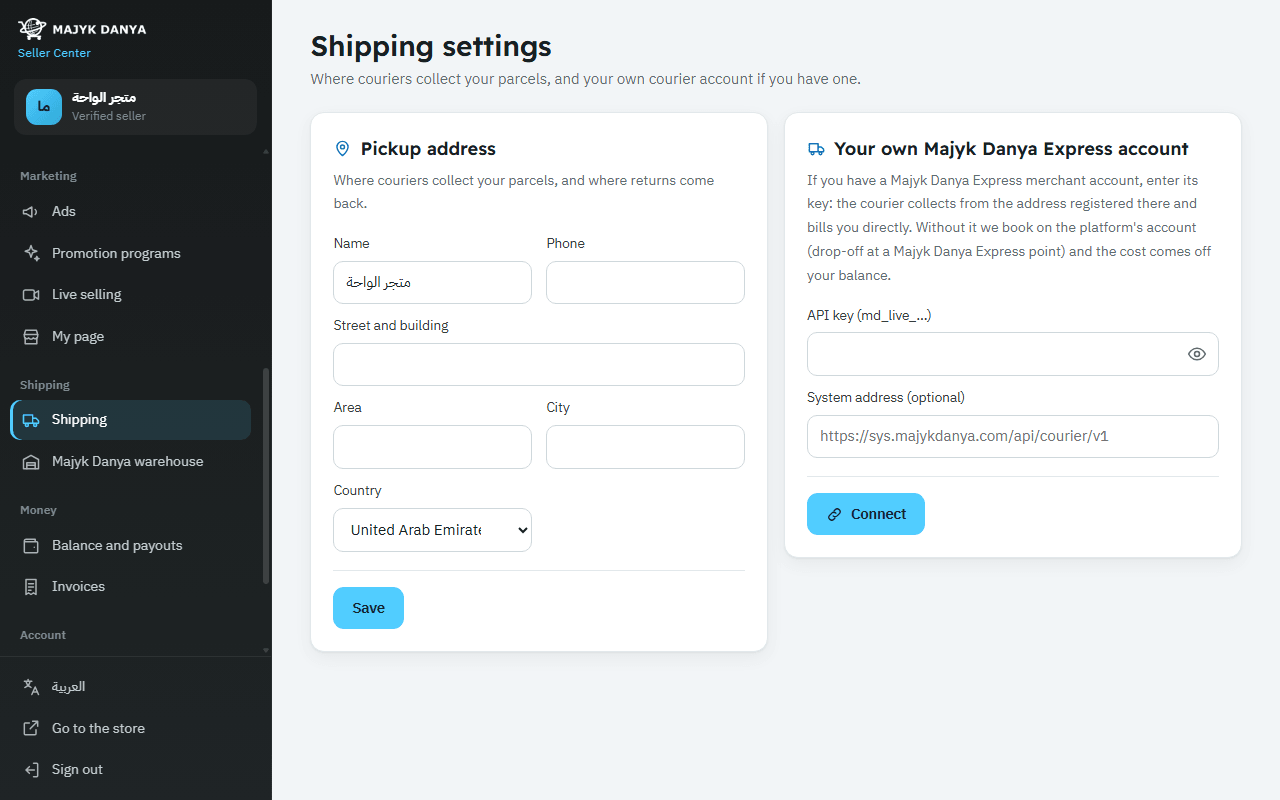
- Once: enter your "Pickup address" in Shipping settings and press "Save". Aramex and SMSA won't take a booking without it, and returns come back to it too.
- Open the order and, in the "Ship with a courier" section, check the label price under each courier's name, then press "Book with" and the courier's name. If you hadn't accepted the order yet, it is accepted automatically.
- The "Waybill" number appears. Press "Print label" and stick it on the parcel.
- Hand the parcel to the courier. The system follows the shipment's events (from the courier's notifications, or by asking about every 30 minutes): pickup makes the order "Shipped", delivery makes it "Delivered", and a refusal by the buyer cancels it.
- Follow the shipment in the same section or with "Track parcel".
Connecting your own Majyk Danya Express account
If you have a Majyk Danya Express merchant account, connect it: the courier then collects from the address registered with them and bills you directly. Without it, bookings use the platform's account: you drop the parcel at a Majyk Danya Express point and the label price comes off your balance.
- Open Shipping settings, card "Your own Majyk Danya Express account".
- Paste the key into "API key (md_live_…)". Leave "System address (optional)" empty unless you were told otherwise.
- Press "Connect". The system tests the key before saving it, stores it encrypted, and shows "Connected".
- To remove it, press "Disconnect".
Test mode
Keys that start with md_test_ create test shipments in the courier's sandbox: no driver ever collects or delivers them. Use them only to try things out, and connect a key that starts with md_live_ before shipping real orders.