
Registering as a seller
What you need before you start, how to fill in the sign-up form, and what happens until your account is active.
Registering on Majyk Danya costs nothing and happens entirely in the seller center. The form takes a few minutes; then you turn on two-step sign-in, upload your documents, and our team reviews them before activating your account.
Before you start
Selling on Majyk Danya is for licensed businesses, so the form asks for a trade licence or commercial registration number. Have these ready:
- A work email address; it becomes your sign-in to the seller center.
- Your trade licence or commercial registration number, and the company's legal name exactly as written on it.
- Your tax number, if your company is VAT registered.
- The contact person's mobile number with the country code.
- A phone with an authenticator app for two-step sign-in.
- Clear copies of the required documents as PDF or images.
Fill in the sign-up form
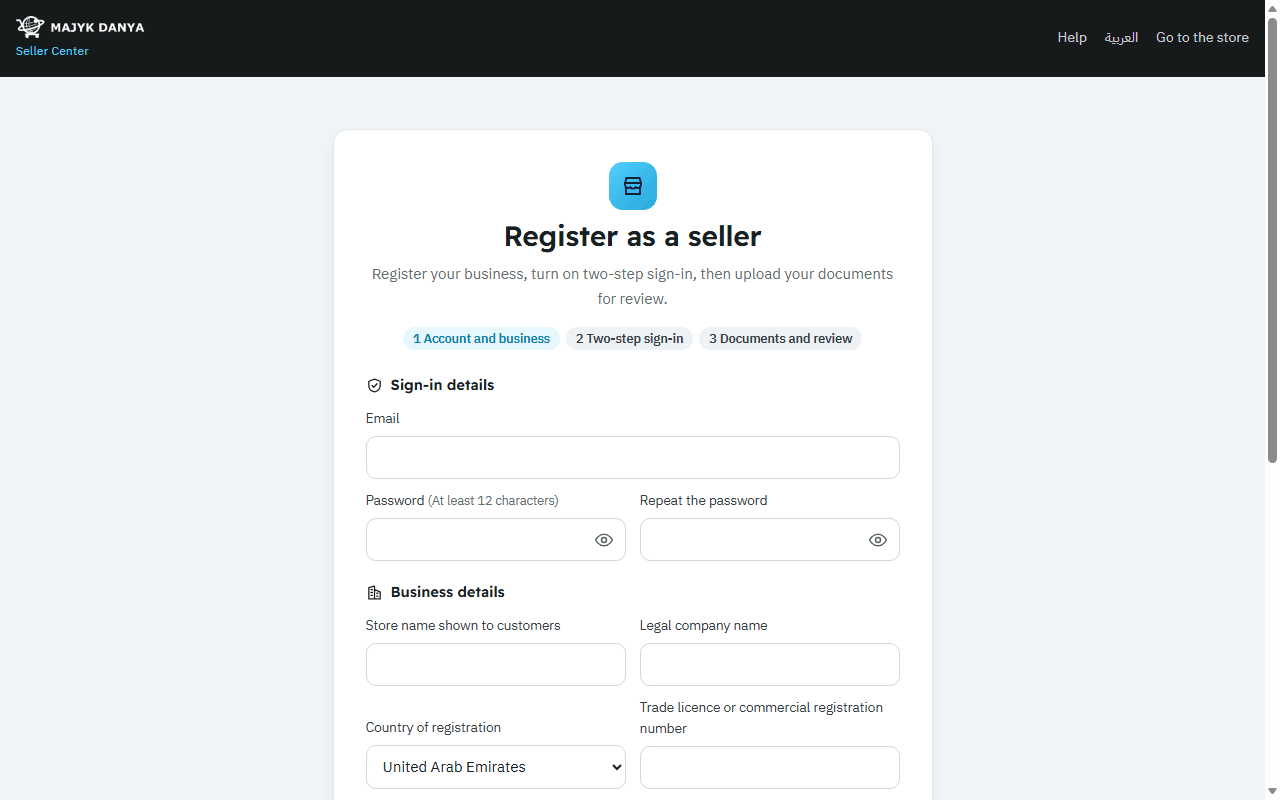
- Open “Register as a seller” on seller.majykdanya.com.
- Under “Sign in”, enter your “Email” and a “Password” (at least 12 characters), then “Repeat the password”. The eye button next to the field shows what you typed so you can check it.
- Under “Business details”, enter the “Store name shown to customers” and the “Legal company name”, choose the “Country of registration”, then enter the “Trade licence or commercial registration number” and the “Tax number (if VAT registered)”.
- Under “Where do you want to sell?”, keep the countries you want to sell in ticked.
- Under “Contact person”, enter the name and the “Mobile with country code”, for example +971 50 123 4567.
- Read the seller agreement, tick “I have read and accept the selling terms and commissions”, then press “Create the account”.
- You go straight to “Turn on two-step sign-in”. This step is required; no other page opens before it.
Field rules
| Field | Rule |
|---|---|
| Store name | 2 to 80 characters. Every buyer sees it, so it is refused if it contains a phone number, an email, a link or a messaging app's name. |
| Tax number, UAE | The Tax Registration Number (TRN): 15 digits starting with 100. |
| Tax number, Saudi Arabia | The VAT number: 15 digits starting and ending with 3. |
| Tax number, other countries | 5 to 20 letters or digits. |
| Mobile number | International format: starting with + or 00, then the country code. |
| Password | 12 to 128 characters. |
After you sign up
Your “Account status” shows at the top of your Home page, with the next step:
| Status | What it means and what to do |
|---|---|
| “Under review” | Upload the “Required documents”. Once they are all in, your application goes to review by itself. |
| “Needs changes” | The review team sent your application back with a note. Fix what it says and upload the documents again. |
| “Active” | Your account is ready: list products and take orders. |
| “Suspended” | The account can't sell. See Suspension and appeal. |
Until activation, selling pages stay closed, such as listing products, the bank account and your store page. Meanwhile you can set your pickup and return addresses and verify your identity.