
Buyer reviews and ratings
Who can leave a review, how to ask for one the right way, how to reply in public, how to report a review that breaks the rules, and why some reviews are held for checking.
In this article
Buyers leave two kinds of feedback, both only from real buyers who received their orders. You get a notification for every new review.
| Kind | About | Where you see it |
|---|---|---|
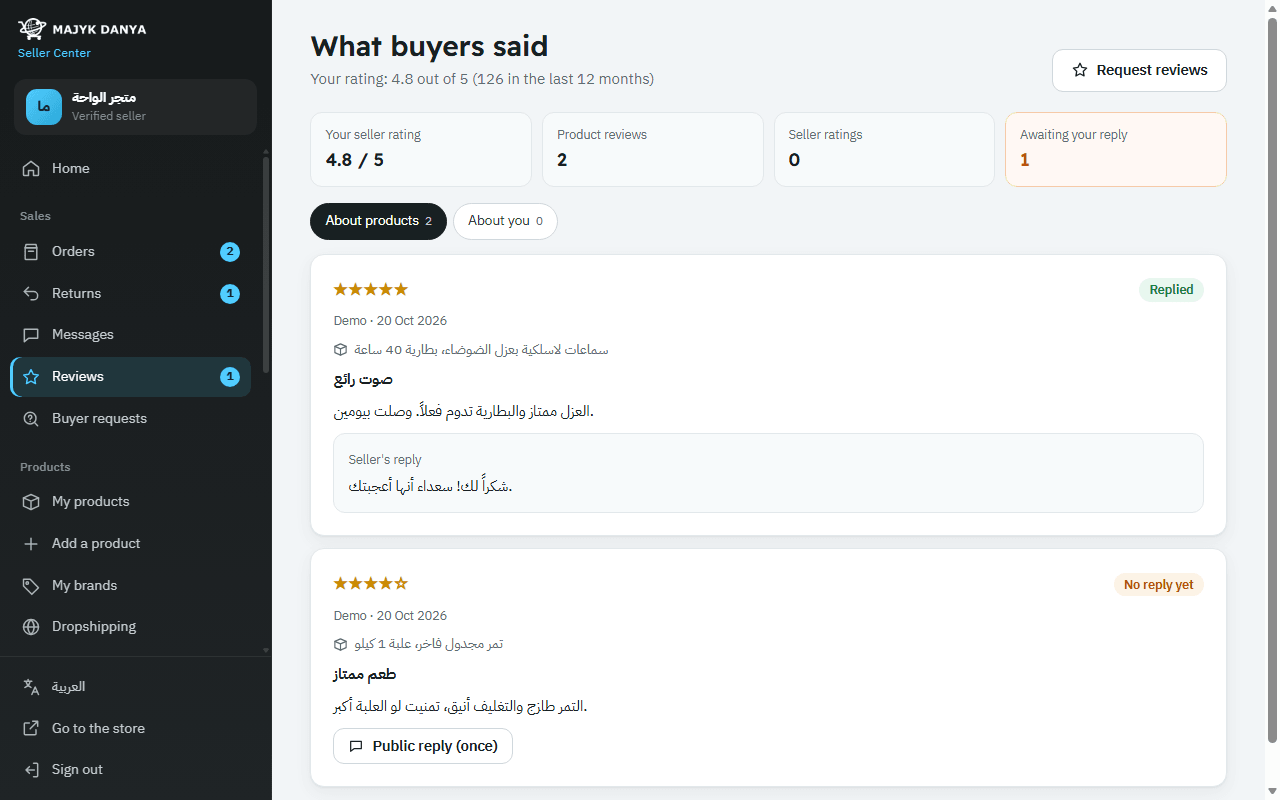
| Product review | The product itself, 1 to 5 stars, with optional text, photos and video. A product's stars combine the reviews from all its sellers | The "About products" tab in Reviews |
| Seller rating | How you handled one order: stars, whether it arrived on time and as described, and an optional comment | The "About you" tab |
Who can review
- Only a buyer who received an order with the product. Their review shows "Verified purchase".
- One review per buyer per product, and one seller rating per order.
- Buyers show by first name and the initial of their last name only.
- Your seller rating is the average of the last 12 months. Once at least 5 buyers have rated you it counts in the race for first place, and a rating under 4 stars lowers your chances.
Requesting a review
- Open a "Delivered" order from Orders.
- Press "Request a review". The buyer gets a fixed notification from Majyk Danya.
The rules: once per order, between 5 and 30 days after delivery, and not if the buyer already rated you for that order. The wording is fixed and you can't add to it.
Replying to reviews
In Reviews, every review without a reply has a "Public reply (once)" field. Your reply shows to everyone under the review as "Seller's reply", can't be edited once posted, and is checked for contact details.
Reviews held for checking
The system publishes a review at once, unless it finds a sign that the team should look first:
- The same words were posted before.
- Words suggesting a review in exchange for a gift, a discount or a refund.
- The buyer's phone matches the seller's.
- A wave of 5-star reviews for one seller in a single day, or from new accounts.
- A video the team needs to watch.
- Reports from 3 different buyers take a published review down until the team checks it.
The team publishes or removes it. Sellers can't remove or hide any review, but they can report one, as the next part explains.
Reporting a review that breaks the rules
You can report a review of a product you sold, or a rating of you as a seller, once per review. The report goes only to Majyk Danya's team; the buyer gets no notification.
- Open Reviews, then the tab with the review.
- Press "Report this review" under the review.
- Choose the reason. If you choose "Something else", write why in "A word for our team"; with the other reasons it's optional.
- Press "Send report".
| Reason | When to choose it |
|---|---|
| "Has a phone number, email or link" | The review contains contact details the automatic check missed. |
| "Offensive language" | Swearing, insults or personal attacks. |
| "Not about the product" or "Not about my service as a seller" | The review isn't about the product or your service, such as a question or a remark about a price elsewhere. |
| "About a delivery Majyk Danya handled" | The complaint is about a delivery you weren't responsible for, such as an order shipped by the Majyk Danya warehouse. |
| "About a different product" (product reviews only) | The review describes a different product from this one. |
| "Something else" | Another reason you explain in a few words (up to 300 characters). |
What happens after you report
- The review stays up as it is until the team checks it. A report on its own never hides a review.
- The team decides: the review stays if it follows the rules, or is removed if it breaks them. When it's removed, the stars are recounted without it.
- The report's status shows under the review: "Reported: our team is checking it", then "Checked: it doesn't break the rules and stays". All your reports and their status, including removed reviews, are under "Your reports" at the bottom of the page.
- You can't report the same review twice, and you see nothing about the buyer beyond what the page already shows.